





LINE Official Account × Zoom automation system

Sales stop when people stop.
Keep them moving with a system.

From LINE Official Account friend adds to seminars, closing and payment.
Lraku runs the whole flow as one.

Coming soon AI integration with Claude and Codex Chatbot support Learn more about Lraku→

Try it on the free plan. No credit card required.

Sound familiar?

You are getting the traffic. What comes after is stuck.

  • You run every seminar and briefing live, and you are running out of energy

  • When you play a recording, viewers notice it is a rerun and drop off

  • You have more tools, but they are not connected

  • You cannot see in numbers where people drop off

  • Even after they decide, days pass before payment and the excitement cools

  • You work alone and are short on hands

  • Treatments keep you busy, so there is no time left to sell products

If even one applies, keep reading.

What is missing is not effort.

Lead generation, messaging, seminars, payment, sign-ups.
You have every tool, yet people are the ones connecting them.

The real reason sales stall

Leads
Manual
Messaging
Manual
Seminars
Manual
Payment
Manual
Sign-ups

So sales move on the days people move, and stop on the days they cannot.

Days you can workSales move
Days you cannotSales stop

Lraku

takes over the work of connecting the gaps.

One continuous flow that does not depend on anyone's availability.

Leads
Messaging
Seminars
Payment
Sign-ups

What Lraku does

Gather, deliver, explain, decide, improve.
Five steps, connected as one.

  1. 01 Gather

    From landing pages and forms
    to LINE friend adds

  2. 02 Deliver

    Step messages send
    guidance in order

  3. 03 Explain

    Zoom seminars
    run automatically

  4. 04 Decide

    Pay and sign up
    right on the screen

  5. 05 Improve

    See drop-offs in numbers
    and act on them

No one has to step in along the way, so this flow keeps running even while you sleep.

Learn more about Lraku→

Three features of Lraku

When LINE and Zoom connect,
this is what changes.

LINE × Zoom
Feature01

A seminar that is recorded,
but does not feel recorded

Content you recorded in advance is held automatically at the time you choose.

  • Comments scroll by live
  • Show questions and choice buttons
  • Show attendee and response counts in real time

Even when automated, it keeps the feeling of taking part.
Feature02

Pay and sign up
right on the spot

Show a credit card payment screen right in the Zoom window.

  • Create sales pages at no extra cost
  • Supports a deadline countdown
  • From sign-up to the next message, in one flow

Stops the excitement from cooling at "I will pay later."

Feature03

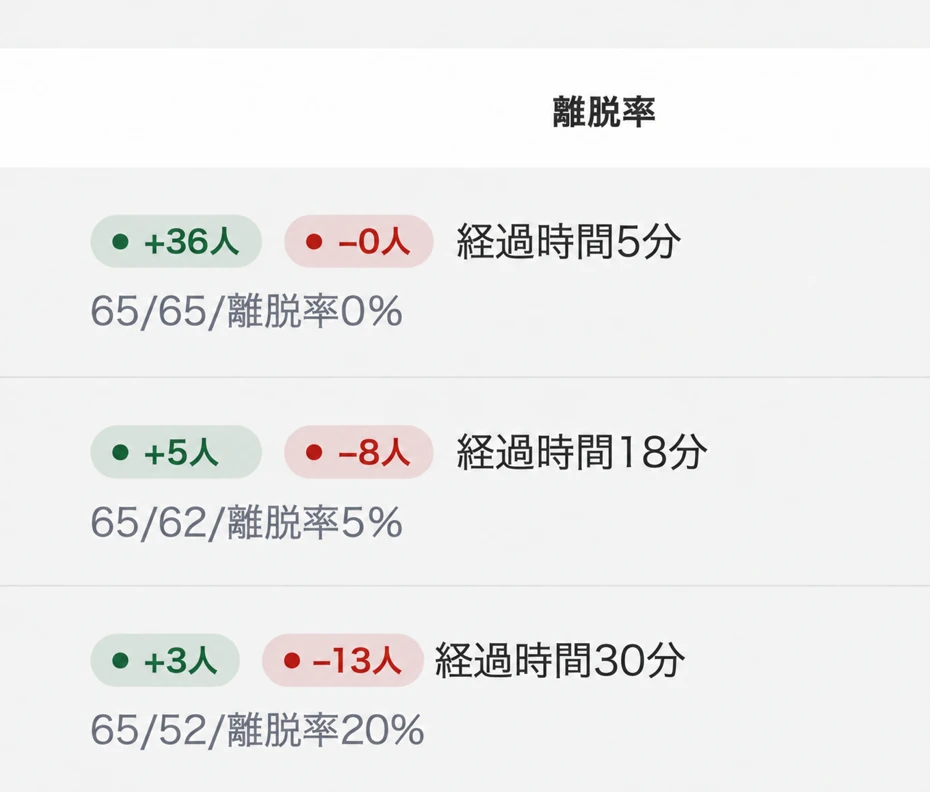
See in numbers
where people drop off

Which entry point people came from, how far they got, and where they left.

  • Show where people left as a drop-off rate
  • Measure clicks and sign-ups
  • See what to fix next

The more you use it, the more your messaging becomes an asset.

Screenshot of the analytics screen (in Japanese)

Coming soon

Less guesswork in setup,
with AI and chat.

We are building an environment where you can set up LINE messaging and Zoom integration without wrestling with technical terms.

Coming soonAI integration

We are preparing setup
by conversation

Tell Anthropic's Claude or OpenAI's Codex something like "send applicants a reminder the day before," then review and confirm as you set up Lraku. We are preparing this feature.

Say what you want→Review the settings→Apply to Lraku
Coming soonChatbot support

Ask questions
right where you work

Ask in chat from inside Lraku and check how to set things up or use a feature. We are preparing this feature.

* AI integration and chatbot support are planned features. The release date is not yet decided; we will announce it, together with the supported scope, once it is.

Attract and deliver in one place

Build the landing page.
Deliver through a member site.

Without subscribing to another page builder, you can connect customer acquisition before LINE registration with courses and materials delivered afterward, all inside Lraku.

Build acquisition pages

Landing page creation

Create pages for products and seminars without specialist knowledge, and keep the journey through LINE registration or sign-up in one service.

Free planUp to 3 pages
¥16,800 and ¥26,800 monthly plansUnlimited

Deliver courses and materials

Member site creation

Organize courses, videos and materials for members only, and manage delivery after purchase without moving to another service.

¥16,800 monthly planUp to 3 sites
¥26,800 monthly planUnlimited

Use cases by industry

Here is how it can be used.

  • Instructors, schools
    and classes

    Hold seminars and briefings automatically. Add more dates without adding to the presenter's load.

  • Professional firms

    Automate pre-consultation guidance. Shorten consultations and start with the main topic.

  • Salons and clinics

    Automate everything from post-visit follow-up to the next booking. Sell products over Zoom too.

  • Restaurants

    Bring in-store guests to LINE and send reasons to visit. Change the message based on how they respond.

  • Small and mid-sized businesses

    Hold briefings automatically and focus on one-to-one conversations. Quality stays the same even when staff change.

Getting started

From sign-up to your first use

  1. STEP 01

    Create an account

    Use the button on this page to go to the Lraku details.

  2. STEP 02

    Initial setup

    Connect your LINE Official Account to Lraku and complete the required settings.

  3. OPTION

    Online consultation

    We learn how you attract customers today and suggest what can be automated.

  4. STEP 03

    Go live

    Start with one flow, then expand as you watch the numbers.

Learn more about Lraku→

Pricing

You can start for free

No setup fee. No contract term, and you can cancel at any time.

* LINE's own LINE Official Account plan fees are charged separately.

For those who want to try it first

Free plan

¥0

No credit card required

For those who want to plan and automate LINE messaging

Standard plan

¥16,800/ month (tax incl.)

All LINE extension features included

Recommended

For those who want to automate through Zoom

Premium plan

¥26,800/ month (tax incl.)

Zoom integration and auto-webinar support

FeatureFreeStandardPremium
Setup fee Free Free Free
Monthly fee Free ¥16,800 (tax incl.) ¥26,800 (tax incl.)
LINE messages Up to 1,000 / month Unlimited Unlimited
Landing page creation Up to 3 pages Unlimited Unlimited
Member site creation — Up to 3 sites Unlimited
Zoom integration — —
Auto-webinar — —
Calendar delivery No figures shown Figures, copy and move Figures, copy and move
Data analytics —
Step messages Unlimited Unlimited Unlimited
Rich menus Up to 2 Unlimited Unlimited
Response forms Up to 2 Unlimited Unlimited
Traffic sources Up to 2 Unlimited Unlimited
Flex messages — Unlimited Unlimited
Store reservations Up to 1 Unlimited Unlimited
Store staff registrationUp to 3 people Unlimited Unlimited
Automatic payment Available Available Available
Sales page creation Up to 1 Unlimited Unlimited
Staff Up to 1 person Unlimited Unlimited
Registered media Up to 500 MB Unlimited Unlimited
Dedicated LINE support Available Available Available

FAQ

Frequently asked questions

QI am not good with computers. Can I still use it?

AYes. Once the initial setup is done, your daily work is just entering the text of your messages. A setup support plan is also available.

QCan I keep using my current LINE Official Account?

AYes. Enter the Channel ID and Channel Secret of your account's Messaging API into Lraku, then paste the Webhook URL that Lraku shows into LINE. Only one Webhook URL can be set, so if another tool is using it, you will be switching it over to Lraku. Friends you had before connecting are added to Lraku's friend list when there is activity on LINE, such as sending a message.

QDo I need to pay for the LINE Official Account separately?

AYes. The LINE Official Account's own fee (the monthly amount for your plan) is charged separately from Lraku's fee. The number of messages you can send on LINE also follows that plan's limit.

QDo I need a separate Zoom contract?

AIf you hold events on Zoom, you need your own Zoom account. Enter the connection details of the app you create in Zoom into Lraku, and register a Meeting ID and Passcode for each seminar. If you hold a seminar with "Video (simulated live)," which plays a recorded video at a set time, Zoom is not used.

QDo I need to prepare a video for a seminar or briefing?

AEither works. You can hold it live on Zoom, or use "Video (simulated live)" to play a video you recorded in advance at a set time. For video, you register the URL of a video hosted on a service such as Dropbox or Vimeo.

QHow do I cancel?

AYou can cancel at any time from "Contract & Payment" in the admin screen. After canceling, you can keep using your current plan until the day before the next renewal date, and from the renewal date you return to the Free plan. Before the renewal date, you can also undo the cancellation.

QCan I get a refund?

ADue to the nature of the service, we do not offer refunds after payment. If you switch to a lower plan, the difference for the period already paid is not refunded.

START FREE

Start by
trying it free.

You can start Lraku on the free plan.
No credit card registration is needed.
See what it can do, and which parts of your current flow can be automated.

Questions and consultations before you start are welcome.

Learn more about Lraku

No setup fee · No contract term
